

A virtual admin assistant is a remote professional who takes over the recurring operational work that eats into a founder’s week. Unlike an executive assistant, they execute rather than make judgment decisions. A managed admin assistant gives you the reliability of an in-house hire and the flexibility of a freelancer, without either one’s drawbacks.
It’s after working hours, and you’re still at your desk, retyping the same vendor invoice into the accounting system for the third time this month because the numbers don’t match what came through email. Tomorrow continues with recurring tasks like chasing shipment updates; all these administrative tasks take up time that could be spent on actually running the business and making executive decisions.
You know you need to delegate this, but how? In-house or freelancer, or try to automate your way out of it?
A simpler answer is to hire an administrative assistant who takes over all these recurring tasks, so your week stops running on tasks that were never supposed to need you.
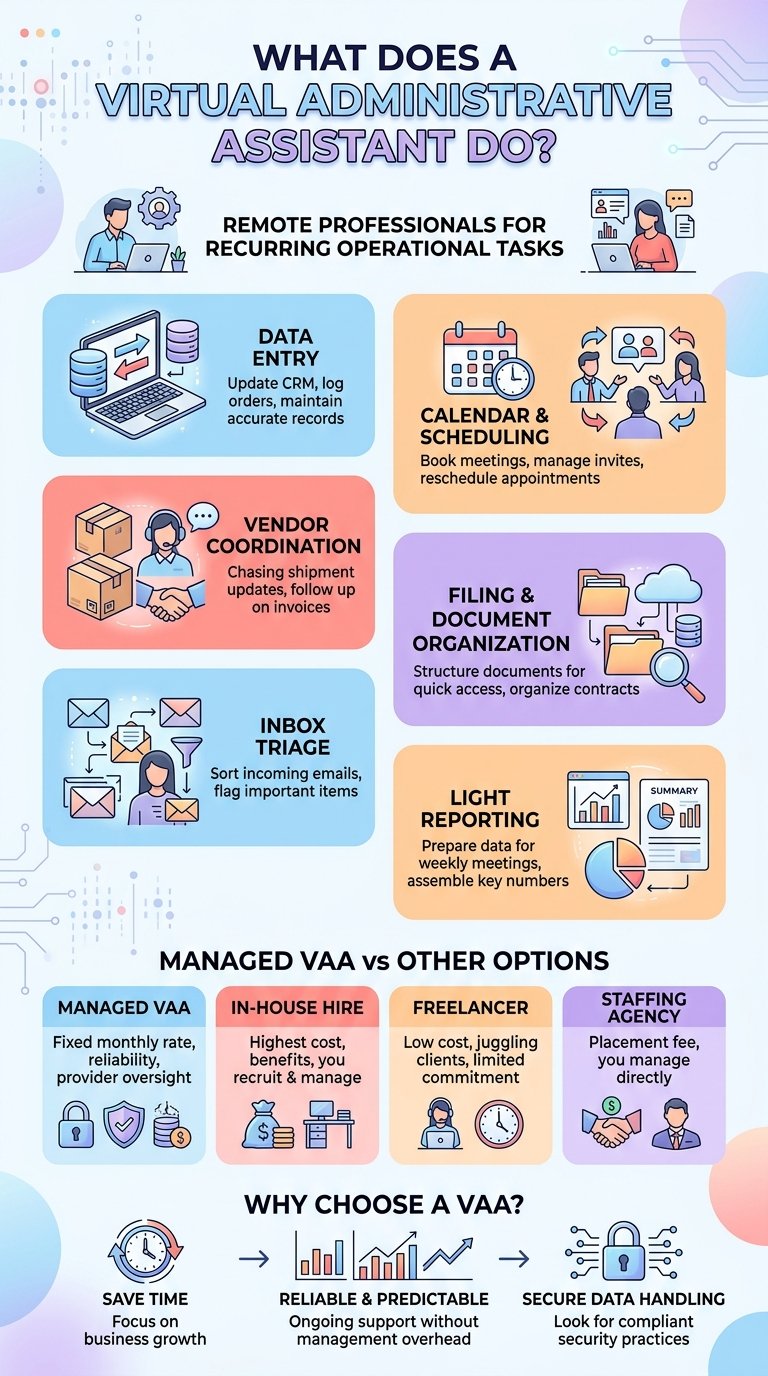

What Does an Administrative Assistant Do?
A remote admin assistant exists to take the repetitive and time-consuming tasks off your plate so that your day doesn’t get filled up with busywork that doesn’t actually need you. The work is less about making important judgment decisions and more about keeping the operational side of the business running on schedule.
Some core virtual admin assistant tasks are:
Data Entry: This is one of those tasks that eats the most time if left unattended. A virtual admin assistant keeps your CRM updated after every sales call, logs new orders the same day they come in, and makes sure customer records are up to date.
Calendar and Scheduling Support: An administrative assistant should ensure your calendar is accurate by booking meetings when requested, sending out invites, and rescheduling when a business call gets moved. If a supplier needs to reschedule a call to a different day, this update should happen without you having to touch your own calendar.
Vendor and Supplier Coordination: Someone has to follow up when a shipment is running late, or an invoice doesn’t match. And an admin assistant handles all this back-and-forth chasing the delivery update, flagging the discrepancy, getting a corrected invoice reissued, so it doesn’t sit in your inbox for a week.
Filing and Document Organization: Usually when contracts get signed, they get buried in other paperwork. An admin assistant or top real estate virtual assistant organizes all this under a file and makes sure it’s constantly updated. So that when you need to find last year’s agreement, you can find it in thirty seconds.
Inbox Triage: No decision-making is allowed; instead, they can just sort through things. An online admin assistant goes through and separates what actually needs a reply from what’s just there for the record, so that you don’t have to scroll past forty newsletters to find the one important email.
Light Reporting: Instead of you having to pull together all the numbers before the meeting on Monday, your admin assistant should have last week’s data assembled and ready for you in your inbox. Learn more about virtual closing coordinator real estate.
What’s the difference between a virtual admin assistant and a virtual executive assistant?
A remote admin assistant handles the operational layer where every task has a clear right answer and doesn’t require reading the room or making a call on your behalf. In comparison, a dedicated remote executive assistant works one level up. Instead of just keeping the calendar accurate, they can make important changes to it, such as resolving conflicts before they land on your desk, and they get to decide who actually gets a time slot.
Instead of just sorting your inbox like a virtual admin assistant would do, they triage it, drafting replies where appropriate and making sure important emails don’t get buried. This is judgement-calling work, not task execution, and it’s why the EA role usually costs more and takes longer to hand off well.
If most of your week is going to filing, data entry, and chasing vendors, an admin assistant can cover this for you. If it’s your calendar and inbox that need someone making decisions on your behalf, then that’s an EA’s job.
Does a virtual admin assistant use AI?
Most do, but they use it as support and not as a substitute. Most good admin assistants now work alongside AI tools built for CRM syncing and anomaly detection, things such as automated field suggestions and error flags inside platforms like Salesforce, so that the records can stay current with less manual upkeep. The assistant verifies what the AI flags and should catch what it can’t. The tools can speed up the checking, but it’s the person who still owns the outcomes. Hire admin assistant.
How Is a Virtual Admin Assistant Different From an In-House Admin, a Staffing Agency, or a Freelancer?
Now that you know what a virtual admin assistant’s duties are and that it fits the work you need done, the next question is what hiring route do you want to choose?
| In-House Hire | Freelancer | Staffing Agency | Virtual Admin Assistant | |
|---|---|---|---|---|
| Cost | Highest | Variable, often lowest upfront | Placement fee + employee fee | Fixed monthly rate |
| Onboarding time | Weeks to months | Fast, but limited system familiarity | Weeks | Days |
| Management | You manage directly | You manage directly | You manage after placement | Provider manages |
| Best for | Long-term, high-touch roles | One-off or short-term tasks | One-time hiring need | Ongoing recurring admin work |
Virtual admin assistant vs in-house hire
An in-house admin hire means a full salary, benefits, office space or equipment, and the time it takes to recruit and onboard someone before they’re actually being productive. It also means one person, so if they’re out sick or on vacation, the work backs up until they’re back. With a virtual admin assistant, you skip most of that overhead. You’re paying for the work itself, not the cost of employing someone full-time, and coverage also doesn’t disappear the moment one person takes a day off.
Virtual admin assistant vs freelancer
A freelancer is usually the right call for a one-off task, a project with a defined end date, or specialized work you don’t need recurring support for. But freelancers have to juggle multiple clients at the same time, set their own hours, and don’t build the kind of ongoing familiarity with your systems that recurring admin work depends on. A virtual admin assistant is the opposite: they have consistent hours, a working knowledge of your CRM and processes that builds over time, and accountability that doesn’t rely on chasing someone down between other jobs.
Virtual admin assistant vs staffing agency
A staffing agency places a candidate with you, then backs off, leaving the day-to-day management, training, and any performance issues in your hands. A virtual admin assistant, on the other hand, keeps that oversight with the provider. Training, quality checks, and replacements are handled for you, so you’re not left managing someone else’s placement on your own.

What Does a Virtual Admin Assistant Cost?
An in-house admin hire usually is the most expensive option once you consider the salary, benefits, payroll taxes, and recruiting time. The numbers always end up higher than the base salary alone, and by the time someone’s fully onboarded and productive, you’ve wasted weeks or months getting there.
A freelancer admin is usually the cheapest upfront, with no benefits, no recruiting overhead, and rates that can look cheap depending on location and experience. But this low price comes with a wide range and very little predictability, since a freelancer is splitting time across other clients and isn’t accountable to your business the way an employee or managed assistant is.
A staffing agency sits in between on cost but not on effort. You typically pay a placement fee on top of the salary. Once the placement is made, the agency takes a step back, leaving you to manage, train, and cover any performance issues yourself- the same overhead as an in-house hire, but an added fee for the introduction.
The better option is a managed virtual admin assistant. The monthly cost is fixed and known upfront, and it typically comes with oversight, quality checks, and a replacement process built in, so the predictability you lose with a freelancer and the overhead you avoid with an in-house hire both land in your favor.
What To Look For When a Virtual Admin Assistant
Not every provider vets, trains, or manages assistants the same way, and it shows fast once the work starts. Look for a provider that screens candidates before you see a profile, rather than handling a raw pool of freelancers to screen yourself. Training matters just as much; someone who has experience using specific tools and workflows you use will make it easier to work with rather than someone learning on the job.
What Does Getting Started Look Like?
Most providers start with a short call to understand what you actually need handled, your preferred tools, your workflows, and how many hours of coverage makes sense for you. From there, you’re matched with an assistant based on that call rather than picking blind from a list. Once matched, there’s an onboarding period where your assistant gets access to your systems and starts learning your processes. Timelines may vary, but many providers can have someone working within a couple of days to a week of that first call.
How Much Time Does Onboarding Take?
Onboarding time is usually less than what most founders expect. Most of the onboarding time is just so that your assistant gets familiar with your working style. It will consist of things like: a call to explain your workflows, granting access to the tools you want them working in, and maybe a walkthrough of a task or two so they understand how you like things done. After that first week, the time you spend drops fast, since a good provider should handle the ongoing training and quality checks without needing you to manage it.
Common Concerns (Security, Quality, Fit)
Usually, a few practical worries tend to hold founders back from actually hiring. Here’s what’s worth asking before you commit to a provider.
Is My Data Secure?
Handing over access to your CRM, inbox, or financial documents is a fair thing to hesitate over. Look for a provider that can show actual security practices, not just promises. Things like restricted and logged access, data encryption, and compliance certificates for your relevant industry (SOC 2, HIPAA, GDPR, depending on what you handle). You should also be able to control exactly what an assistant can see and access.
What if the quality or the fit isn’t right?
This usually comes down to the process. A provider that screens and trains before matching, then has someone also actively checking the work, catches quality issues before they become your problem, and if the fit still isn’t there, a clear replacement policy is what decides whether that costs you a conversation or weeks of lost time. Two important things that need to be asked before committing: what happens when the assistant is off, and what happens if it just doesn’t work out; is there a straightforward way to get a replacement without a long re-onboarding process or added cost?
Where Wing Shows Up
Wing is a fully managed virtual assistant service, so you’re not taking on a new person to manage. Your new Virtual Admin Assistant hire is screened and trained before they even reach you. Once you’ve had a quick call to discuss what needs to be handled, most clients are set up with their assistants within days.
Wing is both ISO 27001 compliant and SOC 2 certified, and the work happens inside Wing Workspace. If your dedicated assistant ever moves on, the context stays put, and a new one picks up right where the last left off. Nothing resets.
Wing covers over 150 roles in general, with Virtual Admin Assistant plans starting at $699/montly for part-time and $999/monthly for full-time. Carty Custom Builders entrusted Wing Virtual Admin Assistant with invoice entry, financial reporting, and CRM upkeep, and they saved over 80 admin hours as a result.
Ready to hand off the recurring admin work? Book a free consultation, and we’ll help you figure out where to start.
Frequently Asked Questions
A virtual admin assistant handles the operational, execution level tasks that keep a business running day-to-day. Such as: data entry, CRM updates, calendar, and scheduling support. The work has clear, repeatable steps and doesn’t require judgment calls on your behalf.
It depends on the option you’re comparing it to. An in-house assistant is the most expensive option once you consider the salary, benefits, and recruiting costs. A freelancer can look cheaper but comes with unpredictable rates and no consistency. A managed virtual admin assistant is the middle option, with a fixed monthly cost and oversight built in. Wing’s dedicated Virtual Admin Assistants start from $699/monthly part-time and $999/monthly full-time.
With the right provider, it should be safe. When looking for a provider to hire your virtual assistant, look for providers with relevant compliance certifications like SOC 2, ISO 27001, or HIPAA. You should also be able to control exactly what an assistant can have access to. Wing has all three of these compliance certifications, as protecting your data and keeping your trust is the most important to them.