

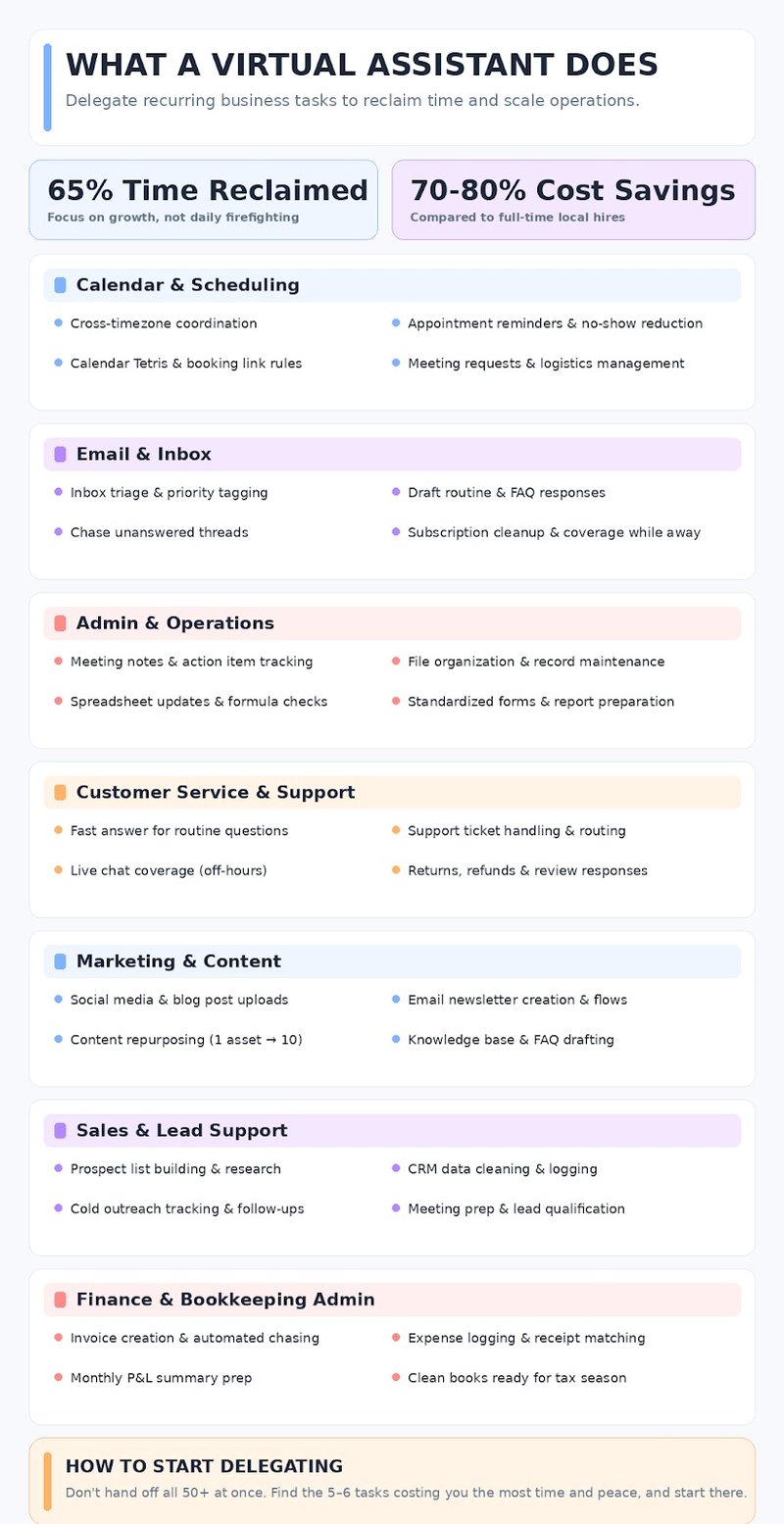
What does a virtual assistant do? They do the recurring work that runs your business but never needs you specifically: inbox, calendar, invoicing, data, sales, marketing, and support. Below are 50+ tasks you can hand off, sorted by category.
Everything you do has blurred into one job that only you seem able to run, so handing off a piece of it feels like it’d take longer to explain than to just keep doing. So you keep doing it. The inbox, the calendar, the invoices nobody’s chased, the reports due again already. None of it is hard. It’s just endless, and it’s all landing on you.
A virtual assistant doesn’t fix that by being another pair of hands you have to manage. If you work with a Wing virtual assistant, they own the work end to end and only bring you the calls that were actually yours to make.
Below are 50+ tasks to outsource to a virtual assistant. You won’t want to delegate all of them. Find the five or six costing you the most, and start there.
Calendar & Scheduling
These are the virtual assistant tasks you’ll feel the fastest. They are quick wins because who doesn’t love to see a notification number go down?
- Schedule meetings and coordinate across time zones. America alone has 9 time zones, and we haven’t even started with international calls for contract workers. Aadhya may be free at your lunchtime, but your virtual assistant knows that is when she takes her afternoon break before doing the third shift.
- Send appointment reminders. Reminders may sound trivial until you count up the number of no-shows. People outside your organization are just not as obsessed with their Google Calendar as you are. Every no-show is time you have blocked, prep work wasted, and ultimately revenue lost.
- Handle rescheduling and cancellations. Moving one meeting is not a huge deal, but by the time the fourth one this week needs to be rescheduled, you’ll be glad your VA is playing that game of calendar Tetris.
- Set up and manage booking links. You told Calendly “Thursdays 2–5 are open” back in January. But now in Q4, it doesn’t know that on Thursday you have to leave early because you have to take your kid to piano lessons. And you only get out the door if Friday’s stakeholder meetings are already prepped. It’ll keep handing those slots to whoever clicks first. A VA keeps the link’s rules matching the life you’re actually living, not the one you set up months ago.
- Gatekeep and triage meeting requests. After three months, your virtual assistant is learning more and more about your client list. They know when the “quick call” is with a chatter that lasts about an hour, and they schedule your day accordingly.
- Book and confirm appointments. Sometimes a meeting could be an email, and sometimes it takes five back-and-forths to land on the right time. This is for the meetings you can’t just fire a scheduling link at: an investor, or the client who does half your revenue. A VA runs the whole back-and-forth, pins down a time that works, and gets it confirmed, so the meeting is genuinely locked, and your professionalism stays intact.
- Coordinate meeting logistics. A meeting with investors is high-stakes. You want to appear charming but also professional. You work on the charm; your virtual assistant is going to make sure that in-person rooms are booked, that all meeting links work, that your PowerPoint has additional notes for you to follow, and sends out the agendas in advance. Learn more about how to hire a personal assistant.
Email & Inbox
DMs, emails, “quick questions”, pings: all of them seem to be designed to pull your focus away from the work you need to get done. Part of a virtual assistant’s responsibilities is to protect your time and mental space so you are not constantly context-switching.
- Triage and flag your inbox. There are plenty of third-party tools that help you organize your inbox, but it doesn’t matter how color-coded your inbox is if you’re constantly too distracted to go through them all. A virtual assistant is doing more than tagging emails; they know which replies you have been anxiously waiting for and which ones you’re just “FYI’d” into.
- Draft routine replies. Sometimes customers just want to ask what is already covered in the FAQ. Your virtual assistant replies quickly and professionally so you don’t lose your mind by Tuesday.
- Chase unanswered threads. Nothing is quite as frustrating as the bottleneck. You asked the contractor for the invoice, the client for the sign-off, the vendor for the quote. They didn’t reply, and now it is your problem. Your VA is the one to (professionally) ping and chase them.
- Clean up subscriptions. As a new business, you’re constantly giving out your professional email. There are newsletters, that one webinar, the tool you trialed once, the market research. Your unread messages easily tick up into the triple (and in some deadly cases, quadruple) digits. Unsubscribing from everything is tedious work, but so worth it when your virtual assistant hands you back an inbox that is actually useful.
- Set up your inbox. Once the cleanup is done, your VA has come to learn your inbox pretty well. From there, they are able to set up folders, tag emails into categories you actually care about, and set rules where they can. Once you’re not overwhelmed by all that clutter, you can start to see what truly needs your attention.
- Coverage while you are away. In the throes and passion of a new company, it might be impossible to think of a time when you’ll be able to disengage. That day will come, and it will come sooner if you know things are managed while you’re away. A virtual assistant can protect your peace from almost everything that pings at you, and they know what actually needs your attention enough to pull you out of holiday mode.
- Learn more about sales assistant for hire.

Admin & Operations
The unglamorous virtual assistant duties that lay the foundations for everything else. The key thought here is “truth”. If your business is running on half-remembered processes, it will never be stable enough to grow.
- Prepare and format documents. Yes, anyone can bold a heading, and if that is all you needed, then a virtual assistant might be a bit of an overreaction. But a VA takes the same set of information and shapes it around whoever’s reading it. The numbers you highlight for a client aren’t the ones you emphasize with your accountant. Learn more about how much to hire accountant.
- Take notes in meetings. Microsoft might have done us all a great disservice when Teams’ note-taking got very good. It gives us an excuse not to fully pay attention in a meeting, as we all lie to ourselves that we will read the recap. A VA is taking notes, providing what insights they can from past notes, following up with people to make sure their tasks are complete, and spoon-feeding you the information you have already forgotten about.
- Maintain internal records. Walk into a company with nothing written down and every question turns into “ask Sarah,” who’s on leave until Thursday. Your VA documents everything. They remember when an offhand comment in a meeting has ramifications on processes. They are keeping track of who is in charge of what and where you can find that information, because they wrote it all down.
- Organize digital files and folders. Quick question: which folder has the right numbers proposal_final, proposal_final_v2, or proposal_FINAL_actual? Don’t worry, your VA can answer that for you.
- Update and maintain spreadsheets. The world runs on the back of the humble Excel sheet. The lead tracker, the content calendar, the inventory count, the cash-flow sheet, the client roster, the hiring pipeline, the expense log. Each new spreadsheet popped up as needed with no design philosophy and formula spaghetti. You understand them, but right now it is terrifying to look at. Your virtual assistant has learned your systems and is able to keep the sheets current and catch the broken formula before you’ve ordered twice the stock you needed.
- Prepare recurring reports. Every week, or month, or quarter, the same report needs pulling together. It’s not hard. It’s just relentless. The deadline comes around again before you’ve recovered from the last one. A virtual assistant runs it on schedule, every time, so the report is sitting ready before you remember it was due.
- Draft and prepare forms, templates, and contracts. You send the same three documents constantly. The client intake form, the proposal template, the standard contract with the two clauses you always tweak. Keeping them clean is fiddly. You swear you’ll update the rate that went up in March before the next one goes out, but you don’t until you low-ball yourself. A virtual assistant keeps the templates current and fills them in right, so what goes out is what you meant to send. Learn more about digital marketing virtual assistant.
Customer Service & Support
Every message that comes in is a customer deciding whether you’re worth staying with. Most of them don’t need you personally. They need someone fast, consistent, and on-brand, which is the whole point of handing this off. What can a virtual assistant do here? They hold the front line.
- Answer routine customer questions. Someone has to answer the same three questions day in and day out. “Where is my order?” “What is the return policy?” “Do you ship to Canada?” A slow reply on these can send a customer to Trustpilot fast, asking, “Is this company legit?” A speedy response from your VA keeps customers up-to-date, happy, and (hopefully) repeating.
- Handle support tickets. Odd, complicated, or off-book cases can be dealt with because your virtual assistant has accumulated a real understanding of how your business works. A good VA knows being technically correct isn’t always the best kind of correct, and sometimes the rules can bend. That doesn’t mean they are making anything up or going rogue. Escalation rules are laid out in setup, so the genuinely big calls still come back to you. But the day-to-day customer quirks stop being a dead end.
- Staff live chat. If you hire your virtual assistant from overseas, you can set their working hours to cover the US time zones’ evening shift. A visitor with a question at 8 p.m. either gets an answer and buys, or gets silence and leaves. Live chat catches them at the exact moment of doubt.
- Process returns and refunds. The clean returns handle themselves; Shopify makes the label, issues the refund, done. It’s the messy ones that need a person. The customer who’s a week past the window is furious but worth keeping, or the obvious serial returner. Your VA works your policy, handles the back-and-forth, and only brings you the ones that actually need you.
- Respond to reviews. A bad review lands on Judge.me. The VA drafts the response; it’s a measured, on-brand reply that addresses the complaint and de-escalates. You decide whether they post it or draft it for your approval first. Handled well, a one-star becomes proof you deal with problems like a grown-up.
- Route messages across the team. On a small support team, everyone’s half-watching the shared Intercom and the team inbox, which is how a message gets answered twice or not at all. A VA runs the board: reads what comes in and gets each one to the right person, so nothing sits unclaimed and nobody’s stepping on each other. The team stops relying on whoever happens to notice first. Learn more about industries Wing serves.

Marketing & Content
Marketing isn’t one job; it’s a dozen, and you’re a founder, not an influencer. These are the virtual assistant tasks to hand off, so you don’t have to become one.
- Schedule social media posts. If you live in fear of ending up on r/LinkedInLunatics after what you thought was a motivational post, a social media VA can keep your brand voice smooth and on point. They take control of your scheduler and respond to the right comments, so your feed stays alive, and you can post without fear.
- Format and upload blog posts. You wrote the thing. Now it needs a title tag, alt text on the images, the internal links added, headers set right, and it has to not look broken on mobile. None of that is writing, but it’s the hour of fiddly work standing between your draft and a published post. A VA takes the finished words and does the part that makes them go live.
- Update website content. The pricing changed, but the pricing page didn’t. James is on the About page, and he left last year. The banner still says “Summer Sale” in October. Small stuff, but it’s the stuff that makes a business look asleep at the wheel, and it never makes it to the top of your list. A VA keeps the site current so it matches the business you’re actually running today.
- Build and send email newsletters. A marketing virtual assistant knows who should hear what and when, then builds the email system accordingly. A welcome sequence that warms up a new subscriber before you ever ask for the sale. A re-engagement nudge to the client who went quiet three months ago. A follow-up that goes out the day after a demo, while you’re still fresh in their mind. Once it’s built, it keeps working while you sleep.
- Maintain content calendars. Your content calendar cannot depend on when you have the time. It needs one person dedicated to updating and maintaining it. A content writing VA can own a brief’s full life cycle, from conducting research on the topic through to editing and uploading approved posts.
- Repurpose content across formats. One good webinar is a blog post, five LinkedIn posts, a newsletter section, and a dozen short clips. Most of it never gets made, because you recorded the webinar and moved on to the next fire. A virtual assistant takes the one thing you already made and turns it into the ten things you didn’t have time to. The work’s done; the mileage isn’t.
- Draft help docs / knowledge base articles. In all honesty: “do you ship to Canada?” should not be something a customer keeps asking. This should be in your FAQ. Your virtual assistant has been in your ticket feed long enough that they know how to write out your help documents, so hopefully the repetition calms down.
Sales & Lead Support
You didn’t start a business to spend your evenings copy-pasting leads into a spreadsheet and chasing people who ghosted you. But someone has to, or the pipeline just stops.
- Build prospect lists. Before a single email goes out, someone builds the list. It’s slow and unexciting, and it’s the ground the whole pipeline stands on. A sales virtual assistant builds it so the names in your funnel are ones worth chasing.
- Research prospective customers. A name on a list isn’t a lead yet. A VA does the digging so your outreach has something real behind it: what the company actually does, whether they’re the right size, and what they announced last quarter that gives you a reason to reach out. Skip it, and you’re sending a cold blast, or worse, walking into a sales meeting half prepared.
- Clean and organize CRM data. Duplicate contacts, deals parked in a stage they left months ago, the “call back in the fall” that never got a reminder set. A CRM nobody cleans slowly fills with lies, and you plan off it anyway. A VA works through it so you’re not making calls on three-week-old information.
- Update CRM records. Once they have cleaned up your CRM, the virtual assistant doesn’t want to see it dirty again. Every reply, every call, every “moved to next stage” lands in the CRM the moment it happens, so the pipeline on screen matches real life.
- Send and track initial outreach. A sequence sends itself, right up until it’s confidently doing the wrong thing. Emailing a prospect who already bounced. Firing step four at someone who replied “not interested” on step two. Running a subject line that’s been getting ignored for three weeks, because the tool has no idea it’s failing. A VA actually watches the thing, pulls people who shouldn’t still be in it, and flags the step that’s dying.
- Follow up with prospects and schedule calls. Half your deals aren’t a yes or a no yet. They’re “interesting, but not this quarter”. That is real money, just on a slow timer. A VA keeps the timers running: warm replies get worked while they’re still warm, and the “try me in the fall” leads come back to you as a booked call in the fall.
Research & Data
You need to know one specific thing before you can make a decision, and finding it means spending an hour you don’t have. The answer exists. You just can’t be the one to go get it every time.
- Conduct online research. Internet rabbit holes can be a wonderful time waster. In business, it is just a time killer. You have a question: is there demand for this in Canada, who’s already there, what would we be up against? Or maybe you’re a software geek and want to know three project management tools that sync with Notion, what do they cost, and what are the pros and cons? Let your VA do the research; they’ll check it holds up, and hand you a straight answer instead of forty open tabs. You have a business to run after all.
- Research competitors and vendors. Set an alert on a competitor, and you’ll get pinged on everything: every price tweak, every blog post, every LinkedIn update. Most of it’s noise. A VA watches the feed and only surfaces what actually moves the needle for you: the real undercut on your best seller, the feature that just made your pitch harder, the exec they poached. They make sure you’re seeing the moves that matter, not drowning in alerts.
- Compile research into summaries and reports. If the first rule of business is “stay in business,” then the second should be “nobody reads their emails”. Research is only useful if someone reads it. To make sure that they do, your VA’s report needs to cut to the heart of things: what did we actually learn, what matters, what should we do about it, on one page you can skim in two minutes. All these findings reach you in a form you’ll actually use instead of dying in a doc nobody opens.
- Fact-check and source-verify. Leaving clear hallucinations in your deck will look sloppy. Where did that number come from? A figure ChatGPT pulled off a blog in 2021, a “studies show” you never actually checked. Say it to an investor or a client who knows the real number, and you’ve spent credibility you can’t easily earn back. A VA runs down the claims before they go out, confirms they’re real and current, and flags the ones that don’t hold up, so what leaves your desk is something you can stand behind.
- Review and correct AI transcripts where errors are costly.A transcription tool gets you 95% of the way. The other 5% is the dropped “not” that flips a sentence’s meaning. A VA catches what the tool got confidently wrong, because the tool never knows when it’s wrong. That’s the difference between a machine that types and a person accountable for it being right.
- Enter data into business systems. The C and the V are the first keys to wear down on your keyboard because your systems don’t talk to each other. You close a deal in the CRM, and now the same details have to be transferred into the invoicing tool, the project tracker, and the onboarding sheet, manually, four times. A VA does the copy and paste in the tools that won’t connect. Let their keyboard wear down instead.
Finance & Bookkeeping Admin
Falling behind on the books costs nothing… until the day it costs you an awful lot. Usually at the end of the month, or tax season, or the moment you realize you can’t answer a simple question about your own money.
- Create and send invoices. Getting the invoices out should be the dopamine hit after a job well done. So why do you end up doing a week’s billing in one guilty Sunday session? A bookkeeping virtual assistant raises the invoices as the work gets done, sends them, and logs each one so nothing you’ve earned goes unbilled. The money you’re owed stops depending on you remembering to ask for it.
- Follow up on outstanding invoices. If only a sent invoice meant a paid invoice. Chasing the invoice that never got paid is embarrassing, toeing the line between being professional and being a nag. The cash you already earned just sits in someone else’s account. A VA keeps the aging view current, tracks what’s outstanding, and chases the overdue ones, politely and repeatedly, until they clear.
- Handle expenses end to end. You can’t skip the books; you can only put them off, and putting them off is how a Tuesday’s worth of logging turns into a month-end you dread. A VA keeps expenses current as they happen, so it never stacks up. When there are bills to pay, they prep the batch, and you approve it.
- Organize and file receipts. A receipt is worthless the moment you can’t find it, and yours are in a coat pocket, three inboxes, and a photo roll. Come tax time, that’s real money you can’t deduct because you can’t prove it happened. A VA collects them as they come in, matches each one to the transaction it belongs to, and files it where it’ll actually be found. So the deduction you’re entitled to survives the audit you hope you never get.
- Prepare expense reports. Data you don’t read consistently isn’t worth having. At the end of the month, a VA ties everything off, all transactions in, all accounts reconciled, nothing dangling, and turns it into the P&L or the cash-flow view you’ll actually look at. The month gets closed, so you can shut that mental tab, and you go into decisions about hiring or spending knowing what’s actually true.
- Maintain bookkeeping records. A bookkeeping VA keeps the record; your accountant reads it. They keep QuickBooks or Xero current and clean so that when tax season comes, your accountant is doing actual accounting instead of untangling a year of mess at CPA rates. What they don’t do is file your taxes or tell you whether to raise prices. That’s the accountant’s job, and it only works if someone’s kept the books all year. A VA is that someone.
Put the List to Work
Hiring in-house for the same outcomes runs about $5,475 just to fill the seat, and a fully loaded support role costs north of $60,000 a year once you add benefits, payroll tax, and onboarding.
A Wing virtual assistant starts at $699/mo part-time and $999/mo full-time. They’re vetted, trained, and AI-trained in the tools you already run on. Most founders get back around 65% of their leadership time and run 70–80% cheaper than a local hire.
Since you’re handing over inboxes, customer data, and your books, it matters that Wing is ISO 27001 compliant and SOC 2 certified. The work happens inside Wing Workspace, a virtual working environment, so your logins and files stay in one controlled place instead of on someone’s personal laptop. Hire virtual assistant.
Carty Custom Builders, a homebuilder in Austin, handed their back-office work to a dedicated Wing assistant and got back more than 20 hours a week. In their words: “Working with our Wing Assistant has allowed us to focus on building and less on office work.”
You’ve just read 50+ things you could stop doing. Ready to see which you’d hand off first?
Frequently Asked Questions
Start with what’s costing you the most time or peace, usually the inbox, the calendar, or whatever’s been undone longest. Hand over that handful first, then add more as they learn how you work.
Not every one. General tasks like inbox and scheduling suit a general VA; specialist work like bookkeeping or sales needs an assistant trained for it. The list shows the range, so you match the right help to each gap.
It should be, if the provider proves it rather than promises it. Wing is ISO 27001 compliant and SOC 2 certified, and the work stays inside Wing Workspace, not on someone’s personal laptop.
Because the tools still need running. AI drafts and flags, but it can’t read a real buying signal or remember your priorities. A virtual assistant carries the context the tool starts without every time.
Faster than hiring in-house. With a managed service, most clients are working within days. Week one, you give direction; by week two, most founders have stepped back and let their assistant run the day-to-day.