
Teams adopt ClickUp to centralize their work, and one leader quietly becomes the full-time workspace admin. With no dedicated owner, tasks sit unassigned, statuses drift, and dashboards stop reflecting what’s actually happening. A Wing virtual assistant takes over daily ClickUp management: intake, assignments, follow-ups, automations, and reporting.Leaders get an accurate, trusted workspace and hours back each week, without hiring a full-time in-house coordinator.
You bought ClickUp to cut down on coordination work. But the coordination didn’t go away. It moved into the tool, and someone still has to do it. In Asana’s 2023 Anatomy of Work Global Index, knowledge workers spent 58% of their day on “work about work,” and estimated they could save 4.9 hours per week with better processes.
This guide covers what a ClickUp virtual assistant does, which tasks to hand off first, how a VA compares to ClickUp’s built-in AI, what it costs, and how Wing matches you with a trained assistant who can start running your workspace.

What Does a ClickUp Virtual Assistant Do?
A ClickUp virtual assistant is a remote professional who manages your ClickUp workspace day to day, so tasks are assigned, current, and moving toward done without you policing them.
Think of the role as part project coordinator, part workspace admin. A typical day looks like this:
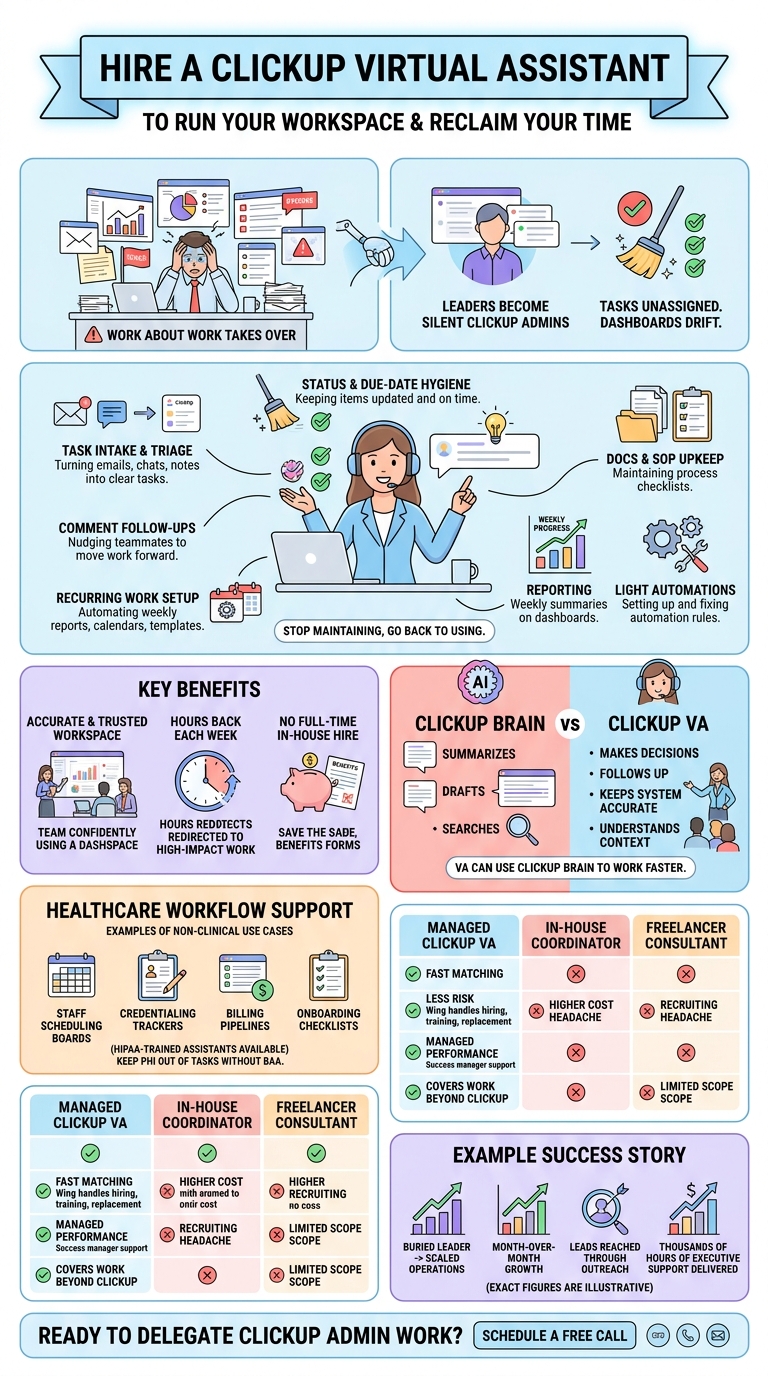
- Task intake and triage: Turns emails, Slack messages, form submissions, and meeting notes into properly scoped ClickUp tasks with owners, priorities, and due dates.
- Status and due-date hygiene: Reviews open tasks daily, flags overdue items, and updates statuses so your views reflect reality.
- Follow-ups: Nudges teammates in comments when work stalls and escalates blockers to the right person.
- Recurring work setup: Builds recurring tasks for weekly reports, monthly invoicing, content calendars, and other repeating workflows.
- Docs and SOP upkeep: Keeps ClickUp Docs, templates, and process checklists current as workflows change.
- Reporting: Prepares weekly dashboard summaries so leadership sees progress at a glance.
- Light automation management: Sets up and maintains ClickUp Automations, and catches the ones that silently break.
The goal is simple: you stop being the person who maintains the system and go back to being the person who uses it.
Which ClickUp Tasks Should You Delegate to a VA First?
Start with high-volume, low-risk work, then hand over ownership of more complex workflows once your VA learns how your team operates.
| Task | Typical time saved per week | Delegation difficulty |
| Converting requests into tasks | 2 to 4 hours | Easy |
| Daily overdue and status sweeps | 1 to 3 hours | Easy |
| Comment follow-ups and reminders | 1 to 2 hours | Easy |
| Building recurring tasks and templates | 1 to 2 hours | Moderate |
| Weekly dashboard and progress reports | 1 to 3 hours | Moderate |
| Updating Docs and SOPs | 1 to 2 hours | Moderate |
| Creating and maintaining Automations | 1 to 3 hours | Advanced |
| Restructuring Spaces, Folders, and Lists | Varies | Advanced |
Time ranges are illustrative and vary by team size and workspace complexity.
A practical rollout:
- Week 1: Intake, status sweeps, and follow-ups.
- Weeks 2 to 3: Recurring tasks, templates, and weekly reporting.
- Week 4 onward: Automations, workspace cleanup, and process improvements your VA proposes.

How Does a ClickUp Assistant Differ From ClickUp AI (ClickUp Brain)?
ClickUp Brain helps you write, summarize, and search inside your workspace. A ClickUp assistant makes decisions, chases people, and keeps the system accurate. You need both for different jobs.
| ClickUp Brain | Wing ClickUp virtual assistant | |
| Summarizes tasks and threads | Yes | Yes |
| Drafts updates and Docs | Yes | Yes |
| Decides who should own a task | No | Yes |
| Follows up with a teammate who’s gone quiet | No | Yes |
| Notices a broken automation and fixes it | Limited | Yes |
| Works across tools outside ClickUp (email, CRM, calendar) | Limited | Yes |
| Understands your team’s priorities and context | Limited | Yes |
The strongest setup is a VA who uses ClickUp Brain to work faster. Wing assistants are trained in AI-augmented workflows, so you get the speed of AI with the judgment and accountability of a person.
Can a ClickUp VA Support Healthcare Teams?
Yes. Clinics, practices, and healthcare operations teams use ClickUp to manage non-clinical workflows, and a VA can keep those workflows running.
Common healthcare use cases:
- Staff scheduling boards: Shift coverage, PTO requests, and on-call rotations.
- Credentialing trackers: Provider licenses, renewals, and payer enrollment deadlines.
- Billing and prior-auth follow-up pipelines: Status tracking for claims, denials, and authorizations.
- Onboarding checklists: New hire paperwork, training modules, and system access requests.
- Practice operations: Vendor contracts, equipment maintenance, and compliance task calendars.
A note on patient data: ClickUp will sign a business associate agreement, but it is only available for Enterprise plan users. Without a BAA, you should not store, process, or transmit Protected Health Information (PHI) in ClickUp. If you’re on a lower tier, keep PHI out of tasks and comments and track work with non-identifying references instead.
Wing offers HIPAA-trained assistants who understand these boundaries. Learn more about Wing’s healthcare virtual assistants and medical billing virtual assistants.
How Much Does a ClickUp Virtual Assistant Cost?
A managed ClickUp VA typically costs far less than an in-house coordinator and carries less risk than a freelancer, because the provider handles hiring, training, and replacement.
| In-house project coordinator | Freelance ClickUp consultant | Wing managed VA | |
| Monthly cost | [Insert salary + benefits estimate] | [Insert typical hourly range] | [Insert current Wing plan pricing] |
| Hours | Full-time | Project-based or hourly | Part-time or full-time plans |
| Recruiting and vetting | You | You | Wing |
| Training | You | Varies | Wing, plus your onboarding |
| Management overhead | High | Medium | Low, with a dedicated Wing success manager |
| Replacement if it doesn’t work out | Restart hiring | Restart search | Wing reassigns |
| Covers work beyond ClickUp | Yes | Rarely | Yes |
Freelancers on platforms like Upwork or Fiverr can be a good fit for a one-time workspace build. If you need someone to run ClickUp every day, a dedicated managed VA is usually the better value.
Why Is Wing the Right Choice for a ClickUp Virtual Assistant?
Wing matches you with a trained assistant who can manage ClickUp from day one, while Wing handles recruiting, quality, and replacement.
- Fast matching: Get an assistant whose skills fit your workflows.
- Managed support: A Wing success manager oversees performance.
- Beyond ClickUp: Your VA also handles email, outreach, research, and CRM updates.
- Healthcare-ready: HIPAA-trained assistants are available for clinics and practices.
Case Study: Living Spec
Living Spec co-founder Dylan Schiemann was buried in admin work. His Wing assistant, Clarissa, took over email, outreach, research, and ClickUp task management.
- 30% month-over-month growth, up from 20%
- 3,000+ leads reached through outreach
- 13,140+ hours of executive support delivered
“It seems like Wing does a pretty good job matching people almost automatically. Maybe there’s magic behind the scenes.”
Dylan Schiemann, Co-Founder
Get a ClickUp-ready assistant on your team. Schedule a call with Wing and stop being your workspace’s full-time admin.
Frequently Asked Questions
ClickUp gets messy without an owner. Spaces multiply, statuses go stale, and automations break quietly. A Wing project manager virtual assistant keeps your workspace structured and accurate so your team trusts what they see.
Yes. A Wing CRM and automation specialist can build and maintain ClickUp Automations for task assignments, status changes, and reminders, and fix the ones that stop firing.
Usually not. Most Wing clients add their administrative virtual assistant as a Member with access to specific Spaces. Admin rights are only needed for workspace-wide settings, integrations, or user permissions.
Yes. A Wing executive assistant can move work between ClickUp, email, Slack, Google Workspace, and your calendar. For CRM-heavy teams, a Wing CRM data entry assistant keeps records in sync with your ClickUp tasks.
Yes. Wing offers a HIPAA-compliant virtual assistant for clinics that manage operations in ClickUp. For specific workflows, a Wing credentialing coordinator can run your credentialing tracker, and a healthcare virtual assistant can manage scheduling and onboarding boards.
Book a call with Wing, share how your team uses ClickUp, and Wing will match you with a virtual assistant whose skills fit your workflows.

Dianne Florendo is a content writer who creates engaging SEO content about virtual assistants, outsourcing, and business productivity.