
Most teams sign up for Make, build a few scenarios, then stall once workflows need routers, error handling, or more than two apps. Half-built and unmonitored scenarios fail quietly, burn through operations, and push bad data into your CRM, invoices, and calendars. A dedicated Make virtual assistant builds, monitors, and maintains your automations as part of their daily work, and handles the manual steps automation can’t cover. Your workflows run reliably, errors get caught before customers notice, and your team gets back hours for work that needs a human.
Repetitive work is still eating the week. In UiPath’s Office Worker Survey, respondents said they waste an average of four and a half hours a week on tasks they believe could be automated. Make is one of the best tools for getting those hours back, but only if someone actually owns it.
This guide covers what a Make VA does, how it compares to hiring a freelancer or doing it in-house, which workflows to hand off, what skills to screen for, and how Wing Assistant matches you with a Make VA who can take over your setup.
What does a Make virtual assistant actually do?
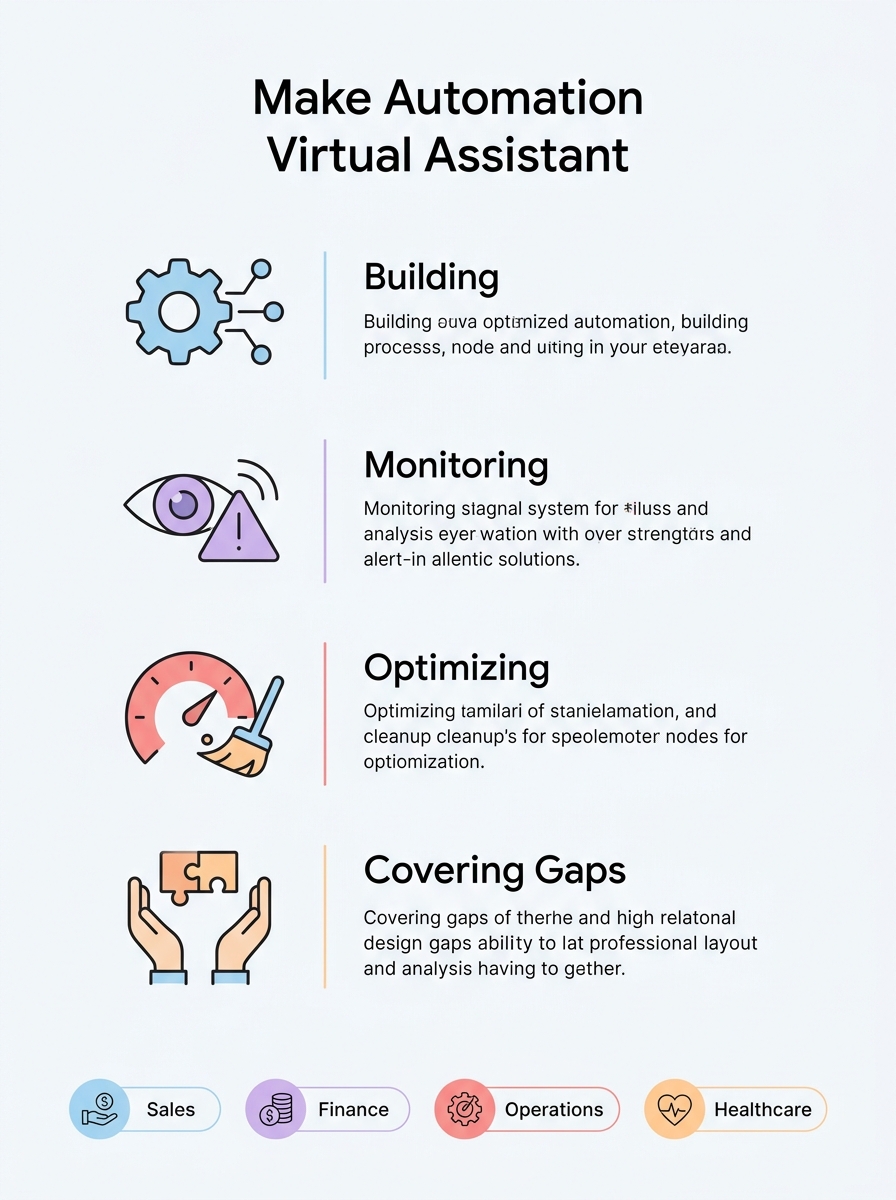
A Make virtual assistant is a remote team member who builds and runs your Make scenarios as an ongoing responsibility. They don’t hand over a finished automation and disappear. The work usually falls into four buckets:
- Building: Turning your manual processes into scenarios, including triggers, routers, filters, data mapping, and connections to your apps.
- Monitoring: Checking execution history, catching failed runs, and fixing broken modules when an app changes its API or a field gets renamed.
- Optimizing: Reducing wasted operations, cleaning up duplicated scenarios, and restructuring workflows that have grown messy over time.
- Covering the gaps: Handling the human steps around the automation, such as reviewing flagged records, following up on exceptions, and updating data that doesn’t fit a rule.
That last bucket is where a VA beats a pure automation contractor. Most real workflows are 80% automatable. Someone still needs to handle the other 20%.

Make VA vs. freelancer vs. in-house: which is right for you?
Each option solves a different problem. Here’s how they compare.
| Factor | Freelance Make expert | In-house hire | Managed Make VA |
| Best for | One-off builds with a clear scope | Large automation programs | Ongoing builds plus daily maintenance |
| Ongoing monitoring | Usually not included | Yes | Yes |
| Handles manual exceptions | Rarely | Sometimes | Yes |
| Availability | Project-based | Full-time | Dedicated, set hours |
| Replacement if it doesn’t work out | You restart the search | You restart hiring | Handled by the provider |
| Cost structure | Hourly or per project | Salary plus benefits | Monthly subscription |
Choose a freelancer if you need one complex scenario built and you have someone internal who can maintain it.
Choose an in-house hire if automation is core to your product or you’re running dozens of mission-critical workflows across departments.
Choose a managed Make VA if you want someone who owns your automations day to day, fixes problems as they come up, and also picks up the admin work connected to those workflows.
What Make workflows can a VA build and manage?
If a task follows a repeatable pattern and moves data between apps, a Make VA can likely automate it. These are the most common handoffs by function.
| Function | Example workflows |
| Sales and CRM | Route new leads from web forms to HubSpot or Pipedrive, enrich contact records, assign owners, and alert reps in Slack |
| Finance and billing | Generate invoices from closed deals, sync payments from Stripe to accounting software, and flag overdue accounts |
| Scheduling | Create calendar events from booking forms, send reminders, and log appointments in a tracker |
| Reporting | Pull weekly metrics from multiple tools into Google Sheets or Airtable and post summaries to a team channel |
| Operations | Onboard new clients or hires by creating folders, accounts, and task lists from a single form submission |
| Marketing | Publish content across channels, collect form responses into email lists, and tag contacts by campaign |
| Healthcare admin | Route intake form submissions, send appointment confirmations, and update internal trackers (with proper data safeguards) |
A good starting point: list the tasks your team repeats every week, then ask which ones involve copying data from one screen to another. Those are your first scenarios.

What skills should you look for in a Make VA?
“Knows Make” can mean anything from building a two-module scenario to designing multi-branch workflows with error recovery. Screen for these specifically:
- Scenario design: Can they map a messy business process into a clean flow before building anything?
- Routers and filters: Can they branch logic based on conditions, such as sending high-value leads one way and the rest another?
- Error handling: Do they use error handler routes so a single failed module doesn’t stop the whole scenario or fail silently?
- Webhooks and the HTTP module: Can they connect apps that don’t have a native Make integration by working with APIs directly?
- Data mapping and transformation: Are they comfortable with functions for text, dates, and arrays, and with iterators and aggregators?
- Operations awareness: Do they build efficiently so you’re not paying for unnecessary runs?
- Documentation: Will they write down what each scenario does, so you’re never locked into one person’s knowledge?
- Stack familiarity: Have they worked with the tools you use, such as Google Workspace, HubSpot, Airtable, Slack, ClickUp, or Stripe?
A practical test: share a broken scenario (or a description of a workflow) and ask them to explain how they’d fix or build it. How they reason through it tells you more than a resume.
How much does it cost to hire a Make VA?
Cost depends on the hiring model more than the skill itself.
- Freelancers typically charge hourly or per project. The upfront price can look low, but ongoing fixes are billed separately, and response times vary.
- Agencies often charge project fees or retainers. You get more structure, but you usually pay a premium for account management layers.
- In-house hires carry salary, benefits, equipment, and recruiting costs, plus the time it takes to find someone with the right skills.
- Managed VAs usually run on a predictable monthly subscription that covers a dedicated assistant for set hours, with recruiting, vetting, and replacement handled for you.
When comparing, factor in the cost of doing nothing. Broken automations don’t just waste subscription fees. They create missed leads, late invoices, and hours of manual cleanup.
How do you onboard a Make VA safely?
Giving someone access to your automations means giving them access to the data flowing through them. Set it up properly from day one.
- Use team access, not shared logins. Add your VA as a member of your Make organization or team with the role they need, rather than handing over your own credentials.
- Limit app permissions. Connect apps using accounts or API keys scoped to what the scenario requires.
- Document existing scenarios first. Have your VA audit and write up what’s currently running before changing anything.
- Agree on a change process. Decide which changes need your approval, such as anything touching billing or customer-facing messages.
- Store credentials securely. Use a password manager with shared vaults instead of sending passwords over chat or email.
- Set up error notifications. Make sure failed runs alert both you and your VA, so nothing breaks unnoticed.
Can a Make VA work in healthcare workflows?
Yes, with the right guardrails. Healthcare practices have plenty of automatable admin work: appointment reminders, intake routing, referral tracking, and internal reporting. The key is keeping protected health information (PHI) out of tools and connections that aren’t approved to handle it.
- Check compliance before you build. Confirm whether each tool in the workflow, including Make and every connected app, supports HIPAA requirements and will sign a Business Associate Agreement (BAA) for your plan. Verify this directly with each vendor, since offerings change.
- Design around PHI where possible. Many workflows can pass a record ID or appointment time instead of clinical details, with sensitive data staying inside your EHR or practice management system.
- Work with a HIPAA-trained VA. Your assistant should understand minimum necessary access, secure handling practices, and what not to put in a message or spreadsheet.
- Keep an audit trail. Document what each scenario touches and who has access.
Wing has a strong healthcare vertical, so you can be matched with a VA who already understands practice operations and HIPAA-aware workflows.
Why is Wing the best choice for hiring a Make VA?
Automations only work if the data behind them is accurate. Wing matches you with a dedicated, pre-vetted VA who builds your workflows and keeps your data clean day to day, with recruiting and replacement handled for you.
Case study: Oceans Ventures
This New York venture capital firm was losing leadership time to CRM data entry and deal research. Wing matched them with Bipin, who now handles data verification, enrichment, and pipeline updates in Affinity.
- 848+ days of CRM data and research support
- 5 key data entry tasks offloaded
- 43+ portfolio companies monitored
- Improved deal accuracy and data enrichment
Read the full Oceans Ventures case study
Ready to hand off your Make automations?
If your scenarios are half-built, breaking, or just not getting the attention they need, you don’t have to become an automation expert yourself. Walk us through your Make setup and we’ll match you with a VA who can take it over.
Yes. A Wing CRM & Automation Specialist can audit your current scenarios, repair broken modules and connections, add error handling, and document everything so your setup is easier to maintain. Yes. If you use Zapier, n8n, or custom integrations alongside Make, Wing can match you with a Technical Ops Specialist or an n8n Full Stack Developer for more advanced build Yes. Wing’s CRM Data Entry Assistants handle data verification, enrichment, and pipeline updates, so the records your Make scenarios rely on stay accurate. Yes. Wing’s HIPAA-Compliant Virtual Assistants and Medical Administrative VAs support scheduling, intake, and admin workflows while following secure data handling practices. A Wing Administrative Virtual Assistant or Executive Assistant can also manage inboxes, calendars, data entry, and client follow-ups connected to your workflows.Frequently Asked Questions

Dianne Florendo is a content writer who creates engaging SEO content about virtual assistants, outsourcing, and business productivity.